How to Get TIN ID Online Philippines 2026: Simple Easy Guide
Getting a TIN ID in the Philippines is now easier than before. Whether you are applying for your first job, opening a bank account, starting a small business, working as a freelancer, getting police clearance, applying for NBI clearance, or completing a government transaction, your Taxpayer Identification Number and TIN ID are often required.
In the past, getting a TIN ID usually meant visiting a BIR Revenue District Office, waiting in long lines, filling out printed forms, and sometimes coming back another day because the physical card was unavailable. Today, the process is more convenient because the Bureau of Internal Revenue now allows qualified taxpayers to use ORUS, the Online Registration and Update System, to register and generate a Digital TIN ID.
The Digital TIN ID is now recognized by the BIR as a valid government-issued identification document, subject to authentication and verification. BIR Revenue Memorandum Circular No. 120-2023 explains that individual taxpayers with an existing TIN may apply for a Digital TIN ID through ORUS, and the ID can be verified through its QR code.
This guide explains how to get TIN ID online in simple words, including requirements, ORUS registration, Digital TIN ID download, physical TIN ID application, verification, fees, lost card replacement, and common mistakes to avoid.
What is a TIN ID?
A TIN ID is an identification card or digital ID issued by the Bureau of Internal Revenue to a person or entity with a Taxpayer Identification Number. It proves that you are registered with the BIR as a taxpayer or as a person who needs a TIN for an official transaction.
A TIN ID is commonly used for tax records, employment, banking, business registration, government applications, and identity verification. It is not only for business owners or employees. Students, unemployed individuals, first-time job seekers, foreign workers, freelancers, and one-time taxpayers may also need a TIN depending on their transaction.
The TIN ID may be physical or digital. Both show your taxpayer details and help institutions confirm your BIR registration.
TIN Number vs TIN ID Card
Many people confuse the TIN number with the TIN ID card. They are connected, but they are not the same.
| Item | Meaning |
|---|---|
| TIN Number | The unique taxpayer number assigned by the BIR |
| TIN ID Card | The physical or digital ID that displays your TIN and personal details |
| Digital TIN ID | The online version generated through ORUS or viewed through supported government digital platforms |
| Physical TIN ID | The traditional card issued by the BIR Revenue District Office |
Your TIN number is permanent. Your TIN ID is the proof you show when an employer, bank, agency, or office asks for your taxpayer identification.
Why is TIN ID important?
A TIN ID is important because it helps prove that your taxpayer record exists with the BIR. It is commonly needed for:
For employees, the TIN is usually needed so withholding tax and payroll records can be processed properly. For freelancers and business owners, it is part of tax compliance. For students and unemployed people, it may be needed for one-time transactions under E.O. 98.
Who issues the TIN ID?
The Bureau of Internal Revenue is the only official agency that issues TINs and TIN IDs in the Philippines.
Do not buy TIN ID cards from Facebook sellers, fixers, street stalls, or unofficial “assistance” services. Fake TIN IDs may use invalid numbers or numbers that belong to someone else. Using a fake TIN can cause problems with banks, employers, government offices, and tax records.
Who needs a TIN?
A TIN may be needed by:
Each person or entity is allowed only one TIN. If you forgot your TIN, do not apply for a new one. You must retrieve or verify the existing number.
TIN ID in the Philippines is not SSN, ITIN, or EIN
Some online articles wrongly mention U.S. terms such as SSN, ITIN, EIN, or the IRS. These are not the correct terms for ordinary TIN ID registration in the Philippines.
In the Philippines, the correct agency is the Bureau of Internal Revenue, and the correct taxpayer number is the BIR-issued TIN. U.S. tax terms should not be used when applying for a Philippine TIN ID.
Types of TIN ID in 2026
There are two main types of TIN ID in the Philippines.
Digital TIN ID
The Digital TIN ID is the faster and more convenient option. It can be generated online through ORUS after successful registration or account verification. You can download it, save it on your phone, print it, and present it when accepted by the requesting institution.
The Digital TIN ID includes a QR code for verification. BIR guidance states that the Digital TIN ID is accepted as a valid government-issued ID, subject to verification.
Physical TIN ID Card
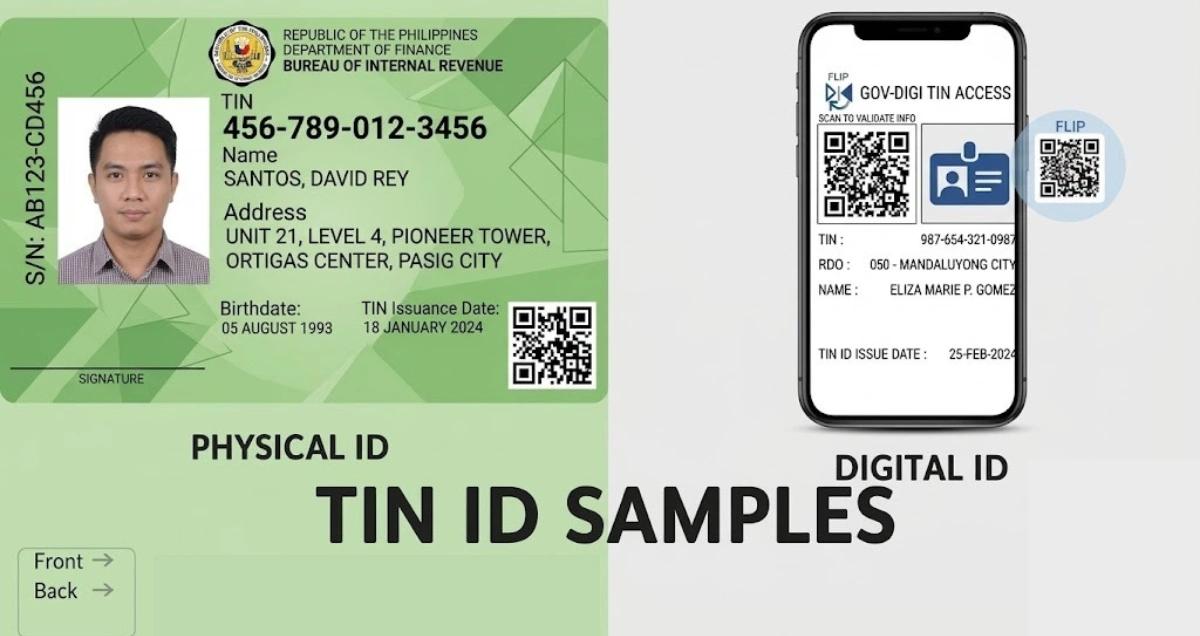
The physical TIN ID is the traditional card issued by the BIR through a Revenue District Office. Older cards may appear yellowish, while newer versions may appear greenish and may include a QR code.
Some RDOs still issue physical cards, but availability depends on the office. If physical card stock is unavailable, the taxpayer may be advised to use the Digital TIN ID instead.
Physical vs Digital TIN ID
| Feature | Physical TIN ID | Digital TIN ID |
|---|---|---|
| Format | Horizontal physical card | Digital file, usually vertical format |
| Where to apply | Assigned BIR RDO | ORUS or supported digital platform |
| Processing time | Same day or 1–3 working days depending on RDO | Available after approval and generation |
| QR code | Available on newer cards | Yes |
| Signature | Usually signed by taxpayer | Signature not required |
| Cost for first issue | Free | Free |
| Replacement | ₱100 if lost or damaged | Can be regenerated through ORUS |
| Best for | Offices that prefer physical cards | Fast online access and easy storage |
What information does TIN ID include?
A TIN ID may include:
A TIN ID does not show salary details, deductions, allowances, net salary, or payroll remarks. Those details belong to payslips, not TIN ID cards.
TIN number sample
A common TIN number format looks like this:
123-456-789
For some business taxpayers, a branch code may appear, such as:
123-456-789-000
Your TIN should be kept private and shared only for official purposes.
Table of Requirements Quick View

| Applicant Type | Main Documents Needed | Correct BIR Form | Online Possible? |
|---|---|---|---|
| Employee | Valid ID and employer details | Form 1902 | Usually through employer |
| Self-employed or freelancer | Valid ID, business details, proof of address | Form 1901 | Yes, depending on case |
| Corporation or partnership | SEC documents, articles, proof of address | Form 1903 | Depends on case |
| Student | Valid ID or PSA birth certificate, reason for TIN | Form 1904 | Yes |
| Unemployed individual | Valid ID and proof of transaction | Form 1904 | Yes |
| Foreign employee | Passport, visa, employment contract | Form 1902 | Depends on case |
| One-time taxpayer | Valid ID and transaction documents | Form 1904 | Yes |
| Lost TIN ID | Affidavit of Loss and valid ID | Form 1905 | Partial |
| Damaged TIN ID | Damaged card and valid ID | Form 1905 | Partial |
How to Get TIN ID Online via ORUS
The easiest way to get TIN ID online is through ORUS, the BIR Online Registration and Update System. ORUS is a BIR online service for taxpayer registration and registration updates.
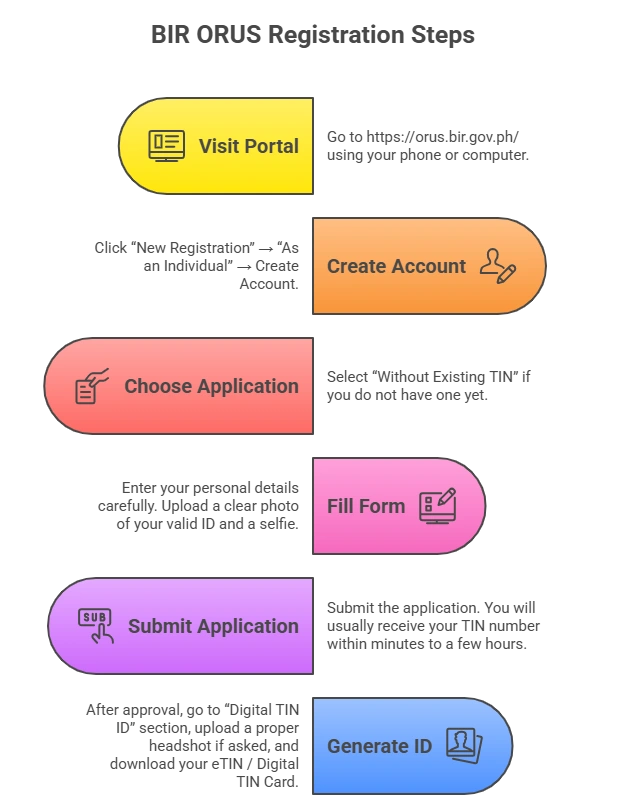
Create an ORUS account
- Go to the official ORUS portal.
- Click New Registration.
- Select As an Individual.
- Read and accept the terms.
- Choose Taxpayer.
- Select Without Existing TIN if you do not have a TIN yet.
- Confirm the reminder that having multiple TINs is illegal.
- Choose the correct application type.
- Enter your full name, birthdate, email, and mobile number.
- Create your password.
- Verify your email.
- Complete your profile.
Apply for a TIN number online
- Log in to your ORUS account.
- Select individual registration.
- Choose the correct taxpayer type.
- Fill out the online form.
- Upload your valid ID.
- Upload a selfie holding the same ID, if required.
- Review all details carefully.
- Submit the application.
- Wait for BIR approval.
- Check your email and ORUS account for updates.
Processing time may vary. Simple applications may be approved faster, while applications with incomplete or unclear documents may take longer.
Generate your Digital TIN ID
Once your TIN is approved:
- Log in to ORUS.
- Go to Digital TIN ID.
- Review your details.
- Upload a clear 1×1 photo with a white background, if required.
- Avoid filters, sunglasses, hats, or unclear selfies.
- Generate your Digital TIN ID.
- Download and save a copy.
- Print it if needed.
- Make sure the QR code is clear and scannable.
How to Get Digital TIN ID if You Already Have a TIN
If you already have a TIN but no card, or if your card was lost, you may generate a Digital TIN ID.
Steps:
If your email or personal details are outdated in the BIR system, you may need to update your record first.
How to Apply for Physical TIN ID Offline In-Person
If you prefer a physical card, you can apply at your assigned BIR Revenue District Office.
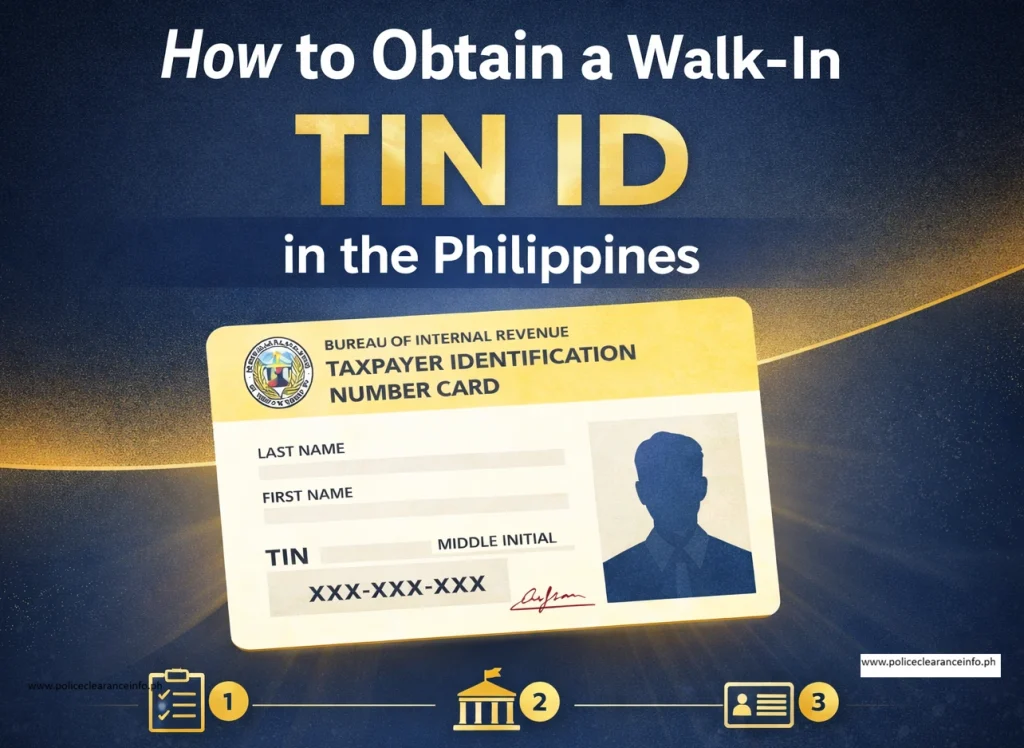
Find your RDO
You cannot go to just any BIR office. Visit the RDO that has jurisdiction over your residence, employment, or business location.
You may check your RDO by contacting BIR, asking your employer, or checking your previous BIR documents. The BIR official website lists the hotline as (02) 8538-3200 and the email as contact_us@bir.gov.ph.
Prepare the correct form
Use the correct BIR form:
- Form 1901 for self-employed, freelancers, and mixed-income earners
- Form 1902 for employees
- Form 1903 for corporations and partnerships
- Form 1904 for students, unemployed individuals, E.O. 98 applicants, and one-time taxpayers
- Form 1905 for updates, correction, RDO transfer, or replacement
Submit your requirements
Bring your completed form, valid ID, photo, and supporting documents. The BIR officer will check your application and encode your details.
Receive your TIN and request your TIN ID
If everything is complete, your TIN may be issued the same day. The physical TIN ID may also be released the same day or within 1–3 working days, depending on workload and card availability.
TIN ID Verification
TIN verification helps confirm that your TIN and personal details match the BIR record.
Method 1: ORUS verification
Log in to ORUS and use the available TIN inquiry or verification feature if available in your account.
Method 2: QR code verification
For Digital TIN ID, scan the QR code to verify authenticity through the official verification process.
Method 3: BIR Revie TIN Validation
The BIR Revie TIN Validation page asks for details such as TIN, name, sex assigned at birth, and birthdate. It also states that hyphens or dashes are not needed when entering the TIN.
Method 4: Contact BIR
You may contact the BIR hotline or email for assistance.
Method 5: Visit your RDO
If online verification does not work, visit your RDO with a valid ID.
TIN ID Fees
| Transaction | Fee |
|---|---|
| First-time TIN issuance | Free |
| Digital TIN ID generation | Free |
| First physical TIN ID | Free, subject to availability |
| Replacement of lost or damaged physical TIN ID | ₱100 |
| Annual Registration Fee | No longer collected effective January 22, 2024 |
The BIR stopped collecting the ₱500 Annual Registration Fee from business taxpayers effective January 22, 2024.
Be careful if someone asks for a high fee to “process” your TIN ID. First-time issuance is free.
Validity of TIN ID
A TIN ID does not expire. It is valid for life as long as your taxpayer record is active and your details are correct.
You do not need yearly renewal, but you should update your BIR record if your address, civil status, name, business activity, RDO, email, or contact number changes.
How to Replace Lost or Damaged TIN ID
Operational For lost TIN ID
Prepare:
- Affidavit of Loss
- BIR Form 1905
- Valid ID
- Recent 1×1 photo, if requested
- ₱100 replacement fee
For damaged TIN ID
Prepare:
- Damaged original TIN ID
- BIR Form 1905
- Valid ID
- Recent 1×1 photo, if requested
- ₱100 replacement fee
Replacement process
- Visit your assigned RDO.
- Submit the required form and documents.
- Pay the replacement fee.
- Ask when the card will be released.
- Claim the replacement card.
If you do not specifically need a physical card, generating a Digital TIN ID through ORUS may be faster and free.
Are Unemployed People and Students Eligible for a TIN ID?
Yes. Unemployed Filipino citizens and students may apply for a TIN ID under E.O. 98 if they need it for an official transaction.
This may include:
Students and unemployed applicants should usually use BIR Form 1904, not Form 1901.
Common Issues and How to Solve Them
ORUS website not loading
Try a different browser, clear your cache, use a stable internet connection, or access the site during off-peak hours.
Email verification not received
Check your spam folder, confirm your email spelling, request another verification email, or contact BIR if needed.
QR code not scanning
Download the Digital TIN ID again and print it clearly. Do not laminate it in a way that makes the QR code blurry.
Incorrect details
File an update using BIR Form 1905 and submit supporting documents.
Forgot TIN
Do not apply again. Verify your existing TIN through BIR tools, your employer, or your RDO.
Multiple TINs
Having more than one TIN is illegal. Report the issue to your RDO and ask how to correct the duplicate record.
Wrong form used
Students and unemployed individuals should avoid using Form 1901 unless they are truly registering as self-employed or as a business taxpayer.
TIN ID vs Other Government IDs
| ID Type | Best For | Digital Version Available? |
|---|---|---|
| TIN ID | Tax, banking, jobs, supporting ID | Yes |
| PhilID or National ID | General identity use | Yes |
| Driver’s License | Driving and general ID | Limited |
| Passport | Travel and strong identity proof | No full replacement |
| Police Clearance | Background check | Sometimes |
| MySSS or UMID-related ID | SSS benefits and identity support | Partial |
A TIN ID is useful, but some institutions may treat it as a supporting ID instead of a primary ID. Bring another valid ID when possible.
Common Uses of TIN ID in 2026
TIN ID is commonly used for:
Frequently Asked Questions
Final words
Getting a TIN ID in the Philippines in 2026 is now simpler because of the BIR ORUS system and Digital TIN ID. For many people, especially students, unemployed individuals, first-time job seekers, and one-time taxpayers, the online process is the fastest and most convenient option.
The key is to use the correct form. Employees usually use Form 1902, self-employed individuals and freelancers use Form 1901, corporations and partnerships use Form 1903, students and unemployed applicants usually use Form 1904, and updates or replacements use Form 1905.
Before applying, check whether you already have a TIN. Never create a second TIN. Prepare clear documents, use official BIR channels, verify your details, and avoid fixers or fake ID sellers.
The Digital TIN ID is free, valid, and easy to access. For most Filipinos, it is now the smartest way to secure proof of TIN registration without unnecessary delays.